
<!-- This issue tracker is only for technical issues related to Bitcoin Core. General bitcoin questions and/or support requests are best directed to the Bitcoin StackExchange at https://bitcoin.stackexchange.com. For reporting security issues, please read instructions at https://bitcoincore.org/en/contact/. If the node is "stuck" during sync or giving "block checksum mismatch" errors, please ensure your hardware is stable by running memtest and observe CPU temperature with a load-test tool such as linpack before creating an issue! Any report, issue or feature request related to the GUI should be reported at https://github.com/bitcoin-core/gui/issues/ -->
<!-- Describe the issue -->
I have attempted to turn of block chain pruning in the options menu, which has required the application to restart. When I have restarted the application I'm faced with this error message and then the program closes.
This now happens every time I open the application and wont load to the wallet, It also persists even after I uninstall the entire bitcoin core and re install the bit coin core program and when I go to initial launch the program this again pops up.
Was working previous but with a pruned block chain and had no problems, but as soon as I went to options and disabled block chain pruning this was the resulting error I received.
"you need to rebuild the data base using -reindex to go back to unpruned mode. This will redownload the entire blockchain. do you want to rebuild the block database now?
ok
error:opening block database
ok
program closes"
If someone knows what I can do to fix this, many thanks
<!--- What behavior did you expect? -->
<!--- What was the actual behavior (provide screenshots if the issue is GUI-related)? -->
<!--- How reliably can you reproduce the issue, what are the steps to do so? -->
<!-- What version of Bitcoin Core are you using, where did you get it (website, self-compiled, etc)? -->
<!-- What type of machine are you observing the error on (OS/CPU and disk type)? -->
<!-- GUI-related issue? What is your operating system and its version? If Linux, what is your desktop enviro 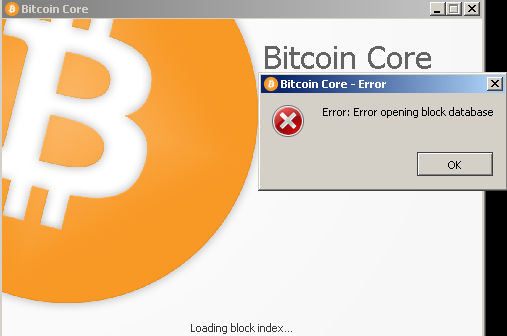 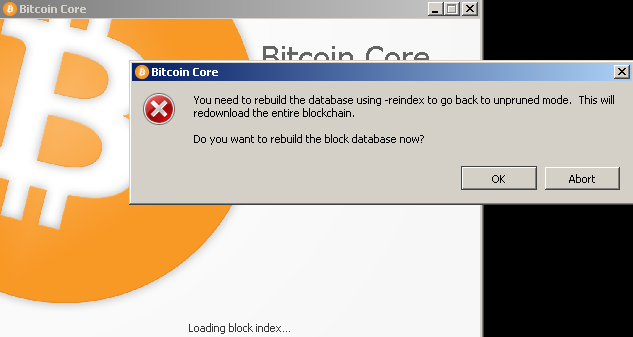 nment and graphical shell? -->
<!-- Any extra information that might be useful in the debugging process. -->
<!--- This is normally the contents of a `debug.log` or `config.log` file. Raw text or a link to a pastebin type site are preferred. -->


