Unable to call an rpc method via CURL 401 error 0.16.0 #12958

issue LaThortilla opened this issue on April 12, 2018
  1. LaThortilla commented at 12:41 AM on April 12, 2018: none

    bitcoin.conf configuration file.

    prune=600 maxconnections=12 maxuploadtarget=20 rpcconnect=127.0.0.1 rpcusr=myusertest rpcpassword=passwrod99555 deamon=1 keypool=10000 rpcport=8332 testnet=1 server=1 # tells Bitcoin-QT to accept JSON-RPC commands.

    request using bitcoin-cli

    user@server[/home/user/bitcoin/bitcoin-0.16.0/bin]# ./bitcoin-cli -getinfo { "version": 160000, "protocolversion": 70015, "walletversion": 159900, "balance": 0.00000000, "blocks": 1289390, "timeoffset": 0, "connections": 1, "proxy": "", "difficulty": 1, "testnet": true, "keypoololdest": 1523395336, "keypoolsize": 10000, "paytxfee": 0.00000000, "relayfee": 0.00001000, "warnings": "" }

    request using curl

    `root@server [/home/user/bitcoin/bitcoin-0.16.0/bin]# curl --user myusertest --data-binary '{"jsonrpc": "1.0", "id":"curltest", "method": "getinfo", "params": [] }' -H 'content-type: text/plain;' http://127.0.0.1:8332/ --verbose Enter host password for user 'myusertest':

    • About to connect() to 127.0.0.1 port 8332 (#0)
    • Trying 127.0.0.1... connected
    • Connected to 127.0.0.1 (127.0.0.1) port 8332 (#0)
    • Server auth using Basic with user 'myusertest'

    POST / HTTP/1.1 Authorization: Basic Yml0Y29yZWFwdXNyOhtPQVJMSnZtR0dFd254dlduZEJmZ3NWekxwbTZFUzI5aGNKVWI= User-Agent: curl/7.19.7 (x86_64-redhat-linux-gnu) libcurl/7.19.7 NSS/3.27.1 zlib/1.2.3 libidn/1.18 libssh2/1.4.2 Host: 127.0.0.1:8332 Accept: / content-type: text/plain; Content-Length: 71

    < HTTP/1.1 401 Unauthorized

    • Authentication problem. Ignoring this. < WWW-Authenticate: Basic realm="jsonrpc" < Date: Thu, 12 Apr 2018 00:44:02 GMT < Content-Length: 0 < Content-Type: text/html; charset=ISO-8859-1 <
    • Connection #0 to host 127.0.0.1 left intact
    • Closing connection #0`

    what is the reazon by which using curl generates error 401?

  2. LaThortilla renamed this:
    Curl 401 error
    Unable to call an rpc method via CURL 401 error
    on Apr 12, 2018
  3. AkioNak commented at 2:46 AM on April 12, 2018: contributor

    @LaThortilla I think that header option in your .curlrc overwrites the Authorization header.

  4. LaThortilla commented at 4:01 AM on April 12, 2018: none

    I already tried without the header

  5. LaThortilla renamed this:
    Unable to call an rpc method via CURL 401 error
    Unable to call an rpc method via CURL 401 error 0.16.0
    on Apr 12, 2018
  6. LaThortilla commented at 1:12 AM on April 13, 2018: none

    Bien. lo he solucionado.. y es que en la versión 0.16.0 hay que utilizar el script: https://github.com/bitcoin/bitcoin/tree/master/share/rpcauth para generar un par de claves que se usaran para la acceder usando curl.

    las credenciales que se generan en rpcauth se deben agregar en el archivo bitcoin.conf

    rpcauth=user:xxxxdfasdasdasxxxxxxasxkjnasxnalksxnlasnxlaksnxlaksnxlaknslxknalsxnalsnxlasnxlasnxla

    y utilizar la otra clave para iniciar session.

    espero les sirva esta info.

  7. LaThortilla closed this on Apr 13, 2018

  8. zychappy commented at 2:58 AM on March 19, 2019: none

    @LaThortilla the qeustion is the same to me,could you tell me how to fix it ?

  9. AkioNak commented at 7:04 AM on March 19, 2019: contributor

    @zychappy Try to add "-q" option as first parameter for curl command. (This will not be read/used the .curlrc config file and prevents side effects.) Or See #10218 (comment) and add rpcauth info to your bitcoin.conf and restart bitcoind.

  10. zychappy commented at 7:23 AM on March 19, 2019: none

    @AkioNak 1 it seems no help for me

    curl -q --user 111:111 --data-binary '{"jsonrpc": "1.0", "id":"1", "method": "getinfo", "params": [] }' -H 'content-type: text/plain;' http://127.0.0.1:8334 -v
    * Rebuilt URL to: http://127.0.0.1:8334/
    *   Trying 127.0.0.1...
    * TCP_NODELAY set
    * Connected to 127.0.0.1 (127.0.0.1) port 8334 (#0)
    * Server auth using Basic with user '111'
    > POST / HTTP/1.1
    > Host: 127.0.0.1:8334
    > Authorization: Basic MTExOjExMQ==
    > User-Agent: curl/7.54.0
    > Accept: */*
    > content-type: text/plain;
    > Content-Length: 64
    >
    * upload completely sent off: 64 out of 64 bytes
    < HTTP/1.1 401 Unauthorized
    < Connection: close
    < Content-Type: text/plain; charset=utf-8
    * Authentication problem. Ignoring this.
    < Www-Authenticate: Basic realm="btcd RPC"
    < X-Content-Type-Options: nosniff
    < Date: Tue, 19 Mar 2019 07:14:54 GMT
    < Content-Length: 18
    <
    401 Unauthorized.
    

    2 the same problem also in rpcclient github.com/btcsuite/btcd/rpcclient/examples/bitcoincorehttp

    status code: 401, response: "401 Unauthorized.\n"
    
  11. AkioNak commented at 8:35 AM on March 19, 2019: contributor

    I'm sorry that my suggestion has not helped you.

    < Www-Authenticate: Basic realm="btcd RPC"

    2 the same problem also in rpcclient github.com/btcsuite/btcd/rpcclient/examples/bitcoincorehttp

    I think this is not a good place to discuss how to connect to btcd using curl or btcd/rpcclient. I hope someone respond to your btcsuite/btcd#1404 .

  12. Pedroxam commented at 10:57 AM on March 29, 2020: none

    I dont know why this people can't make a simple way to connect to json rpc. always have problem. always. If you can't makew, please don't build such a system at all.

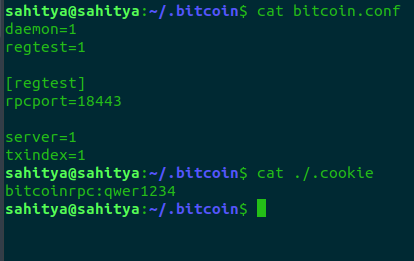
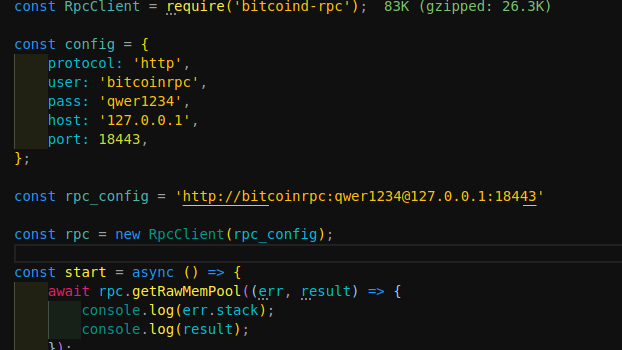
  13. sahityakumarsuman commented at 11:00 AM on May 14, 2020: none

    Screenshot from 2020-05-14 16-25-01

    above is my confi file

    and below is my code to connect as rpc

    Screenshot from 2020-05-14 16-26-15

    I am still getting this below error

    'Error: Bitcoin JSON-RPC: Connection Rejected: 401 Unnauthorized'

    I am in a production application, Please help if possible. @Pedroxam @zychappy @AkioNak @LaThortilla

  14. bitcoin locked this on Feb 15, 2022

github-metadata-mirror

This is a metadata mirror of the GitHub repository bitcoin/bitcoin. This site is not affiliated with GitHub. Content is generated from a GitHub metadata backup.
generated: 2026-05-20 06:55 UTC